Investigate an insider threat by analyzing GitHub repositories for exposed credentials, using OSINT tools to correlate online accounts, and performing image analysis to identify locations.
Unlike in any of my previous write-ups, this time I completed the entire lab before sitting down to write this. I think it’s important to keep the flow of how I answered all the questions, including any mistakes or rabbit-holes. With an OSINT focused room like this one it’s very easy to find false-positives and go on a deep dive on profiles that aren’t related at all to the target.
So let’s get started!
Scenario Introduction
You have been tasked by a client whose network was compromised and brought offline to investigate the incident and determine the attacker’s identity.
Incident responders and digital forensic investigators are currently on the scene and have conducted a preliminary investigation. Their findings show that the attack originated from a single user account, probably, an insider. Investigate the incident, find the insider, and uncover the attack actions.
Fun little scenario we have here. Incident responders have already conducted their preliminary investigation and have found that the attack that compromised and took the network offline came from an insider. Spooky stuff!
We’re given the following lab files: Github.txt. office.jpg, and WebCam.png. We’ll take a closer look at those later on as they come up.
Alright. Question time.
Question one
File -> Github.txt: What API key did the insider add to his GitHub repositories?
We’re told which file we can use to find the answer here. So let’s take a look at Github.txt:
temp_extract_dir> cat ./Github.txt
https://github.com/EMarseille99⏎
We’re given a GitHub profile here, which can contain a lot of juicy OSINT details. Let’s take a look at the profile:
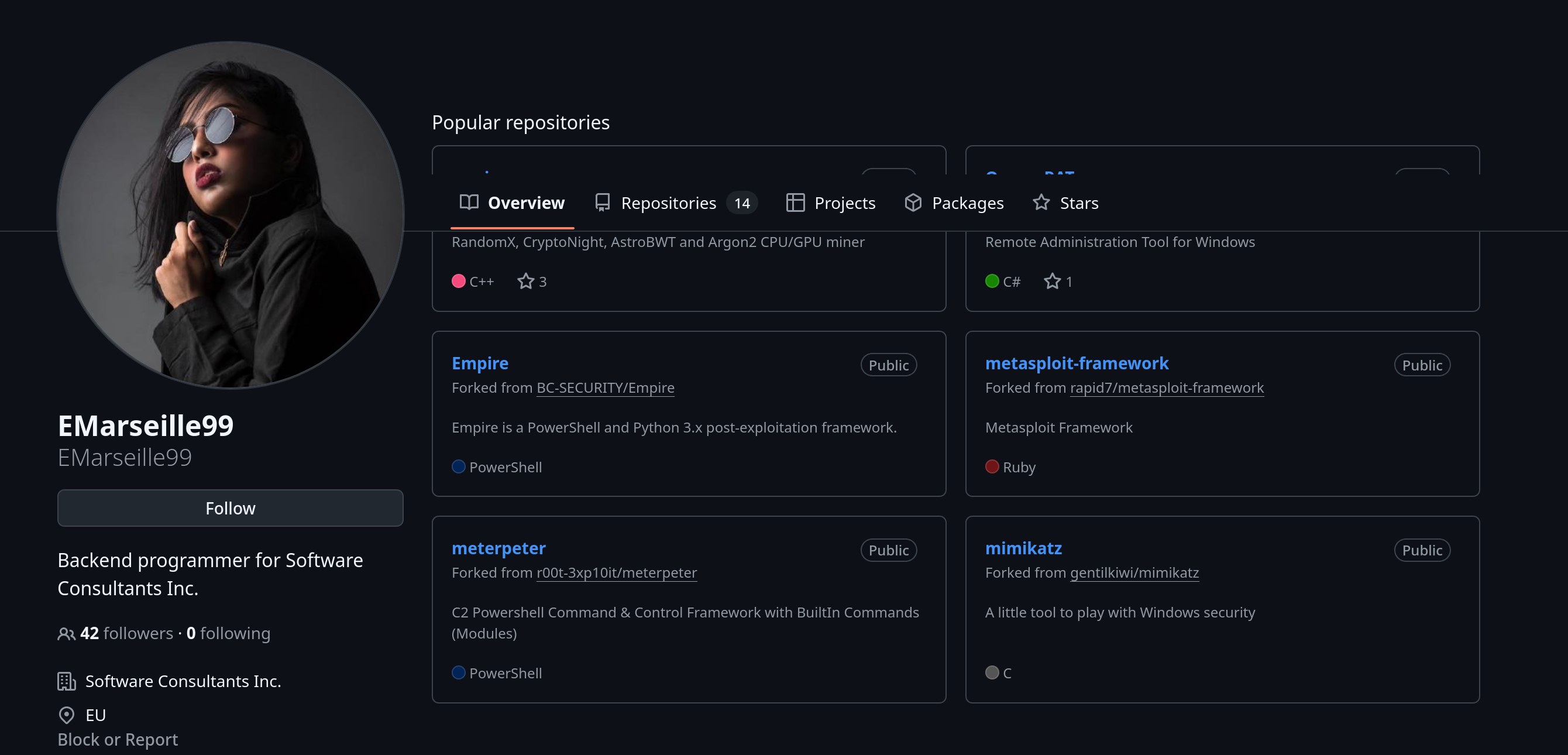
All of the repositories visible in the screenshot above are forks of popular tools. You can see this by the Forked from xyz subtitle under each of the repository titles.
We’re looking for an API key here. So we’ll need to find a repository that this user actually created themselves. If we go to the repositories tab we can see all of the repositories that the user has forked or created:
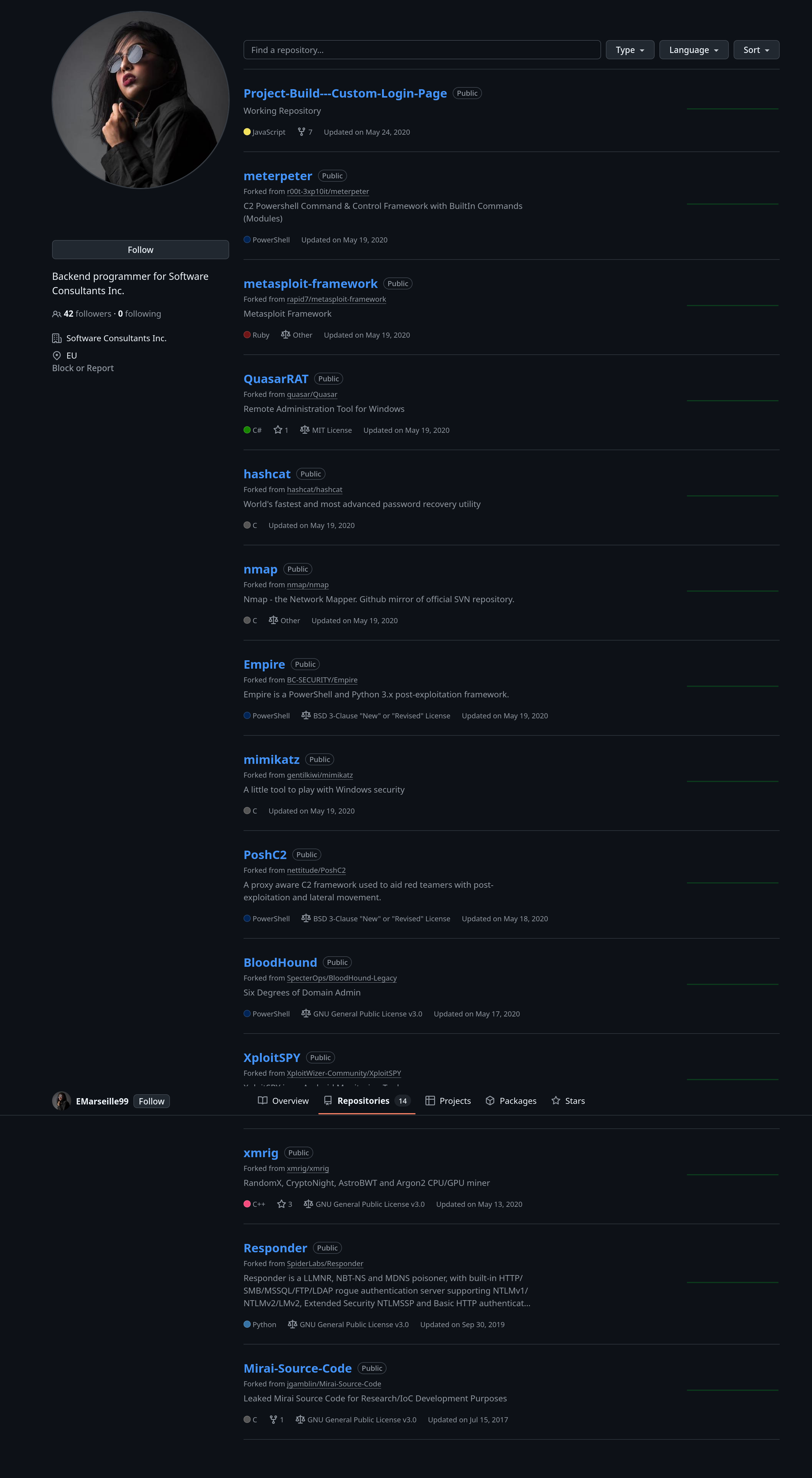
The most interesting one is at the very top. It’s the only one that isn’t a fork of some bigger project. Let’s take a look at that repo now.
There are two files in this repo. Login Page.js and fsociety.js.
The second file isn’t much to note. It’s just some ASCII art of the monopoly mask used by the hacking group in Mr. Robot:
XXXXXXXXXXXXXXXXXXXXXXXXXXXXXXXXXXXXXXXXXXXXXXXXXXXXXXXXXXXXXXXXXXXXXXXXXXXXXX
XXXXXXXXXXXXXXXXXXXXXXXXXXXXXXXXXXXXXXXXXXXXXXXXXXXXXXXXXXXXXXXXXXXXXXXXXXXXXX
XX                                                                          XX
XX   MMMMMMMMMMMMMMMMMMMMMMMMMMMMMMMMMMMMMMMMMMMMMMMMMMMMMMMMMMMMMMMMMMMM   XX
XX   MMMMMMMMMMMMMMMMMMMMMssssssssssssssssssssssssssMMMMMMMMMMMMMMMMMMMMM   XX
XX   MMMMMMMMMMMMMMMMss'''                          '''ssMMMMMMMMMMMMMMMM   XX
XX   MMMMMMMMMMMMyy''                                    ''yyMMMMMMMMMMMM   XX
XX   MMMMMMMMyy''                                            ''yyMMMMMMMM   XX
XX   MMMMMy''                                                    ''yMMMMM   XX
XX   MMMy'                                                          'yMMM   XX
XX   Mh'                                                              'hM   XX
XX   -                                                                  -   XX
XX                                                                          XX
XX   ::                                                                ::   XX
XX   MMhh.        ..hhhhhh..                      ..hhhhhh..        .hhMM   XX
XX   MMMMMh   ..hhMMMMMMMMMMhh.                .hhMMMMMMMMMMhh..   hMMMMM   XX
XX   ---MMM .hMMMMdd:::dMMMMMMMhh..        ..hhMMMMMMMd:::ddMMMMh. MMM---   XX
XX   MMMMMM MMmm''      'mmMMMMMMMMyy.  .yyMMMMMMMMmm'      ''mmMM MMMMMM   XX
XX   ---mMM ''             'mmMMMMMMMM  MMMMMMMMmm'             '' MMm---   XX
XX   yyyym'    .              'mMMMMm'  'mMMMMm'              .    'myyyy   XX
XX   mm''    .y'     ..yyyyy..  ''''      ''''  ..yyyyy..     'y.    ''mm   XX
XX           MN    .sMMMMMMMMMss.   .    .   .ssMMMMMMMMMs.    NM           XX
XX           N`    MMMMMMMMMMMMMN   M    M   NMMMMMMMMMMMMM    `N           XX
XX            +  .sMNNNNNMMMMMN+   `N    N`   +NMMMMMNNNNNMs.  +            XX
XX              o+++     ++++Mo    M      M    oM++++     +++o              XX
XX                                oo      oo                                XX
XX           oM                 oo          oo                 Mo           XX
XX         oMMo                M              M                oMMo         XX
XX       +MMMM                 s              s                 MMMM+       XX
XX      +MMMMM+            +++NNNN+        +NNNN+++            +MMMMM+      XX
XX     +MMMMMMM+       ++NNMMMMMMMMN+    +NMMMMMMMMNN++       +MMMMMMM+     XX
XX     MMMMMMMMMNN+++NNMMMMMMMMMMMMMMNNNNMMMMMMMMMMMMMMNN+++NNMMMMMMMMM     XX
XX     yMMMMMMMMMMMMMMMMMMMMMMMMMMMMMMMMMMMMMMMMMMMMMMMMMMMMMMMMMMMMMMy     XX
XX   m  yMMMMMMMMMMMMMMMMMMMMMMMMMMMMMMMMMMMMMMMMMMMMMMMMMMMMMMMMMMMMy  m   XX
XX   MMm yMMMMMMMMMMMMMMMMMMMMMMMMMMMMMMMMMMMMMMMMMMMMMMMMMMMMMMMMMMy mMM   XX
XX   MMMm .yyMMMMMMMMMMMMMMMM     MMMMMMMMMM     MMMMMMMMMMMMMMMMyy. mMMM   XX
XX   MMMMd   ''''hhhhh       odddo          obbbo        hhhh''''   dMMMM   XX
XX   MMMMMd             'hMMMMMMMMMMddddddMMMMMMMMMMh'             dMMMMM   XX
XX   MMMMMMd              'hMMMMMMMMMMMMMMMMMMMMMMh'              dMMMMMM   XX
XX   MMMMMMM-               ''ddMMMMMMMMMMMMMMdd''               -MMMMMMM   XX
XX   MMMMMMMM                   '::dddddddd::'                   MMMMMMMM   XX
XX   MMMMMMMM-                                                  -MMMMMMMM   XX
XX   MMMMMMMMM                                                  MMMMMMMMM   XX
XX   MMMMMMMMMy                                                yMMMMMMMMM   XX
XX   MMMMMMMMMMy.                                            .yMMMMMMMMMM   XX
XX   MMMMMMMMMMMMy.                                        .yMMMMMMMMMMMM   XX
XX   MMMMMMMMMMMMMMy.                                    .yMMMMMMMMMMMMMM   XX
XX   MMMMMMMMMMMMMMMMs.                                .sMMMMMMMMMMMMMMMM   XX
XX   MMMMMMMMMMMMMMMMMMss.           ....           .ssMMMMMMMMMMMMMMMMMM   XX
XX   MMMMMMMMMMMMMMMMMMMMNo         oNNNNo         oNMMMMMMMMMMMMMMMMMMMM   XX
XX                                                                          XX
XXXXXXXXXXXXXXXXXXXXXXXXXXXXXXXXXXXXXXXXXXXXXXXXXXXXXXXXXXXXXXXXXXXXXXXXXXXXXX
XXXXXXXXXXXXXXXXXXXXXXXXXXXXXXXXXXXXXXXXXXXXXXXXXXXXXXXXXXXXXXXXXXXXXXXXXXXXXX

    .o88o.                               o8o                .
    888 `"                               `"'              .o8
   o888oo   .oooo.o  .ooooo.   .ooooo.  oooo   .ooooo.  .o888oo oooo    ooo
    888    d88(  "8 d88' `88b d88' `"Y8 `888  d88' `88b   888    `88.  .8'
    888    `"Y88b.  888   888 888        888  888ooo888   888     `88..8'
    888    o.  )88b 888   888 888   .o8  888  888    .o   888 .    `888'
   o888o   8""888P' `Y8bod8P' `Y8bod8P' o888o `Y8bod8P'   "888"      d8'
                                                                .o...P'
It’s cute, but we can disregard it for the rest of this lab.
The second file, Login Page.js is the more interesting one. Let’s take a look at it now:
API Key = *******************

<%@ page language="java" contentType="text/html; charset=ISO-8859-1" pageEncoding="ISO-8859-1"%>
<!DOCTYPE html PUBLIC "-//W3C//DTD HTML 4.01 Transitional//EN" "http://www.w3.org/TR/html4/loose.dtd">
<html>
<head>
<title>File Cube's BCFT System</title>

    <link rel="icon" type="image/png" href="images/icons/favicon.ico"/>
    <link rel="stylesheet" type="text/css" href="vendor/bootstrap/css/bootstrap.min.css">
    <link rel="stylesheet" type="text/css" href="fonts/font-awesome-4.7.0/css/font-awesome.min.css">
    <link rel="stylesheet" type="text/css" href="vendor/animate/animate.css">
    <link rel="stylesheet" type="text/css" href="vendor/css-hamburgers/hamburgers.min.css">
    <link rel="stylesheet" type="text/css" href="vendor/select2/select2.min.css">
    <link rel="stylesheet" type="text/css" href="css/util.css">
    <link rel="stylesheet" type="text/css" href="css/main.css">

    <meta charset="UTF-8">
    <meta name="viewport" content="width=device-width, initial-scale=1.0">
    <meta http-equiv="Content-Type" content="text/html; charset=ISO-8859-1">
</head>

<body>

    <div class="limiter">
    <div class="container-login100">
    <div class="wrap-login100">
    <div class="login100-pic js-tilt" data-tilt><img src="images/filecubelogo.png" alt="IMG">
    </div>

<h1>Member Login</h1>

<div>
    <a class="login100-form-btn">Home</a>
    </div>

<!--
This .jsp calls the "UserProfile" servlet at the point in which the user
input's their username and password into the form's text fields
-->

<form class="login100-form validate-form" action="UserProfile" method="post">

<div class="wrap-input100 validate-input" data-validate = "Valid username is required: FileCubeUser100">

    Username: EMarseille99

    <span class="focus-input100"></span>
    <span class="symbol-input100">
    <i class="fa fa-chain" aria-hidden="true"></i>
    </span>

</div>


<div class="wrap-input100 validate-input" data-validate = "Password is required">

    Password: ************
    Password(base64)

    <span class="focus-input100"></span>
    <span class="symbol-input100">
    <i class="fa fa-lock" aria-hidden="true"></i>
    </span>
</div>

<div>
    <input class="login100-form-btn" type="submit" value="Login">
</div>

</form>

</body>

</html>
There’s a lot to unpack here, but for now we can just focus on the very first line. This is the API key, and the answer!
Question two
File -> Github.txt: What plaintext password did the insider add to his GitHub repositories?
We can look at the Login Page.js file again and find the section that details username/passwords. Here’s a shortened down version of the file above with those sections specified:
<form class="login100-form validate-form" action="UserProfile" method="post">

<div class="wrap-input100 validate-input" data-validate = "Valid username is required: FileCubeUser100">

    Username: EMarseille99

    <span class="focus-input100"></span>
    <span class="symbol-input100">
    <i class="fa fa-chain" aria-hidden="true"></i>
    </span>

</div>


<div class="wrap-input100 validate-input" data-validate = "Password is required">

    Password: ************
    Password(base64)

    <span class="focus-input100"></span>
    <span class="symbol-input100">
    <i class="fa fa-lock" aria-hidden="true"></i>
    </span>
</div>
We can see the Username field, and more specifically for the answer we can see the password. Keep in mind that this is encoded in base64. The answer isn’t the encoded base64 string, but we can decode this pretty easily and get the plaintext of the password:
temp_extract_dir> echo "UGljYXNzb0JhZ3VldHRlOTk=" | base64 -d
****************⏎
That’s another answer found!
Question three
File -> Github.txt: What cryptocurrency mining tool did the insider use?
For this question we need to take a look back at the repositories that the user has on their GitHub profile. Taking a quick squizz through this reveals that there’s a cryptomining tool in the list of projects. Check for the one with the description that reads RandomX, CryptoNight, AstroBWT and Argon2 CPU/GPU miner . The name of this project is the answer.
That was a pretty quick question, and that’s it for the GitHub OSINT in this lab.
Question four
On which gaming website did the insider have an account?
This took me longer than it should have. We can Google Dork the username of the user, EMarseille99, to find anywhere that the string has been indexed on Google (Or whatever search engine you’re using). Quick note here that you’ll no doubt find some writeups when you search for the username. Take care to avoid these as they can give you the answers straight away. You’re not learning anything if you use them, though if you’re reading this then… I guess I’m a part of the problem.
I actually found the answer to this question pretty quickly. The answer is one of, if not the most common gaming website available. You probably have an account on it. I wrongly assumed that the question was asking about the game that they played.
I won’t name the gaming website here, because it will reveal the answer (And you likely already know what it is), but there are some pretty good OSINT tools to use out there that will show you information on public profiles. Playtime and achievements are usually all public, and can show you what games someone spends the most time on. Unfortunately, the account they use is private, but we already have the website name. So that’s our answer.
Question five
What is the link to the insider Instagram profile?
Our google-dorking comes into play here again. If you don’t have an instagram, even for OSINT use, then I highly recommend you sign up. Scouring through instagram profiles can be difficult without an account. Sometimes you’ll be met with a ‘sign in to continue’ message, or you just won’t be able to view certain things like stories or tagged images.
There are tools that you can use which will get this information for you, but you need to update which tools you use as they go down pretty often. The best thing to do is just create your own private account to use solely for OSINT uses. If you’re lucky, you can create a believable enough looking account to get some followers, and maybe get access to someone’s private profile for even more OSINT goodies.
If you’re struggling to find the Instagram profile, try the following google dork query: "EMarseille99" site:instagram.com. You should find the URL pretty quickly.
Question six
Which country did the insider visit on her holiday?
Looking through the instagram we can see six images have been posted:
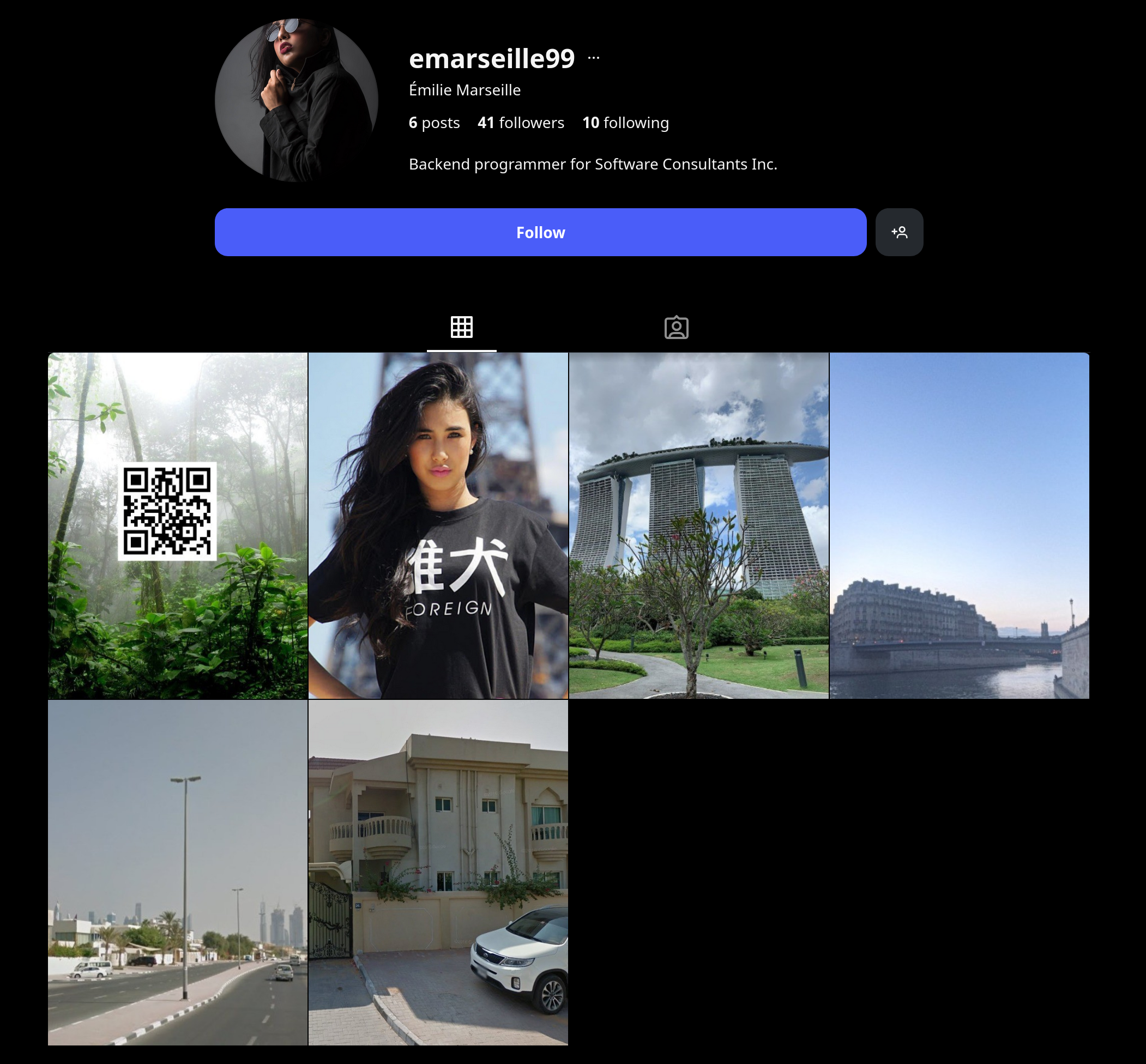 The third image looks promising. It’s the big building with three towers, and a roof over the top of all three. I’ve seen this building before!
Let’s take a closer look at that post:
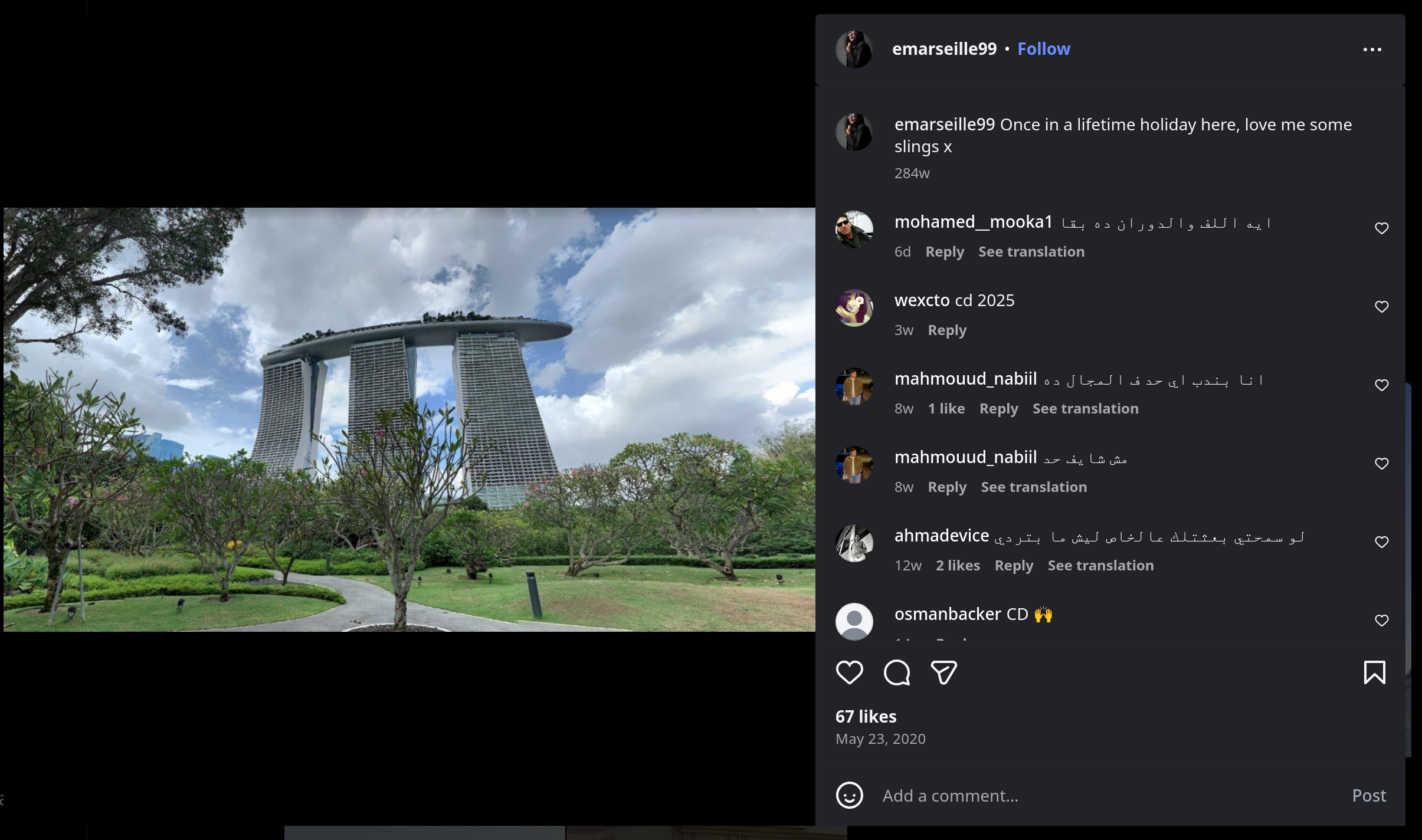
The caption of the image, ‘Once in a lifetime holiday here, love me some slings x’, confirms that this was taken on the target’s holiday, so we know that wherever these buildings are located is the answer.
So how do we find out where this is?
We can use Google Lens, or just Google Images to reverse-image search this. We’re not trying to find an exact copy of the image, just where it’s located. Thankfully these are pretty well known buildings and there are plenty of photos of them online. If you download the photo and pop it in to Google Images (Or any other reverse image search tools) then you should be able to find the country they’re located in pretty quickly.
Question seven
Which city does the insider family live in?
The very first image posted to the Instagram profile has the caption ‘Nice to meet friends & family Photo 1/2’. So we’re on the right track in thinking that wherever these images are located is the answer:
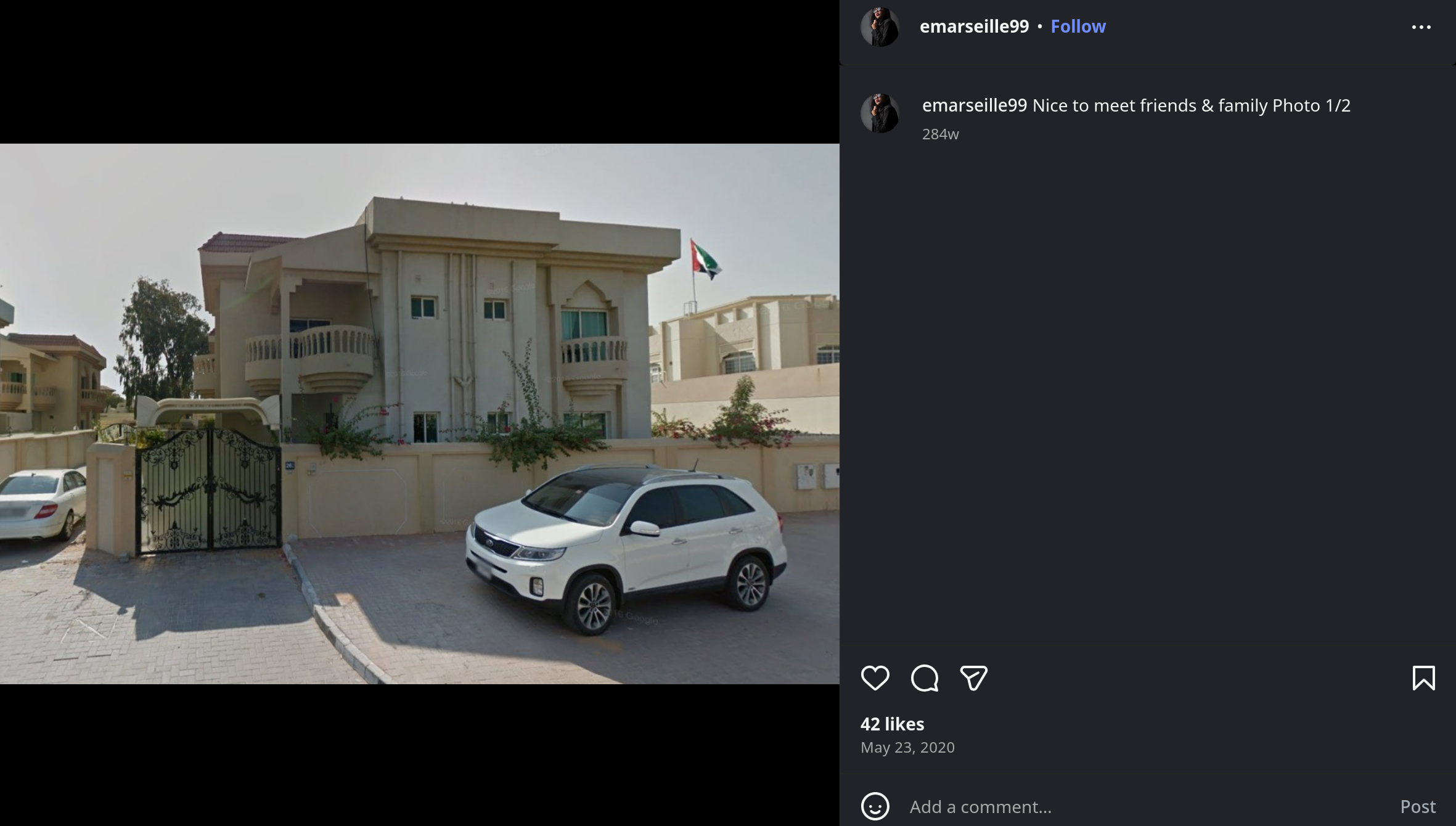
There is a flag visible in this image. It’s hard to make out and ultimately won’t matter, but flags are good to note when you’re conducting an OSINT Investigation.
Note that this is the first of two images from their visit to see their family. The second image posted to their Instagram page is the second photo from this trip to their family (Or reminicing on their past, who knows). Thankfully this second image gives us a much more obvious clue:
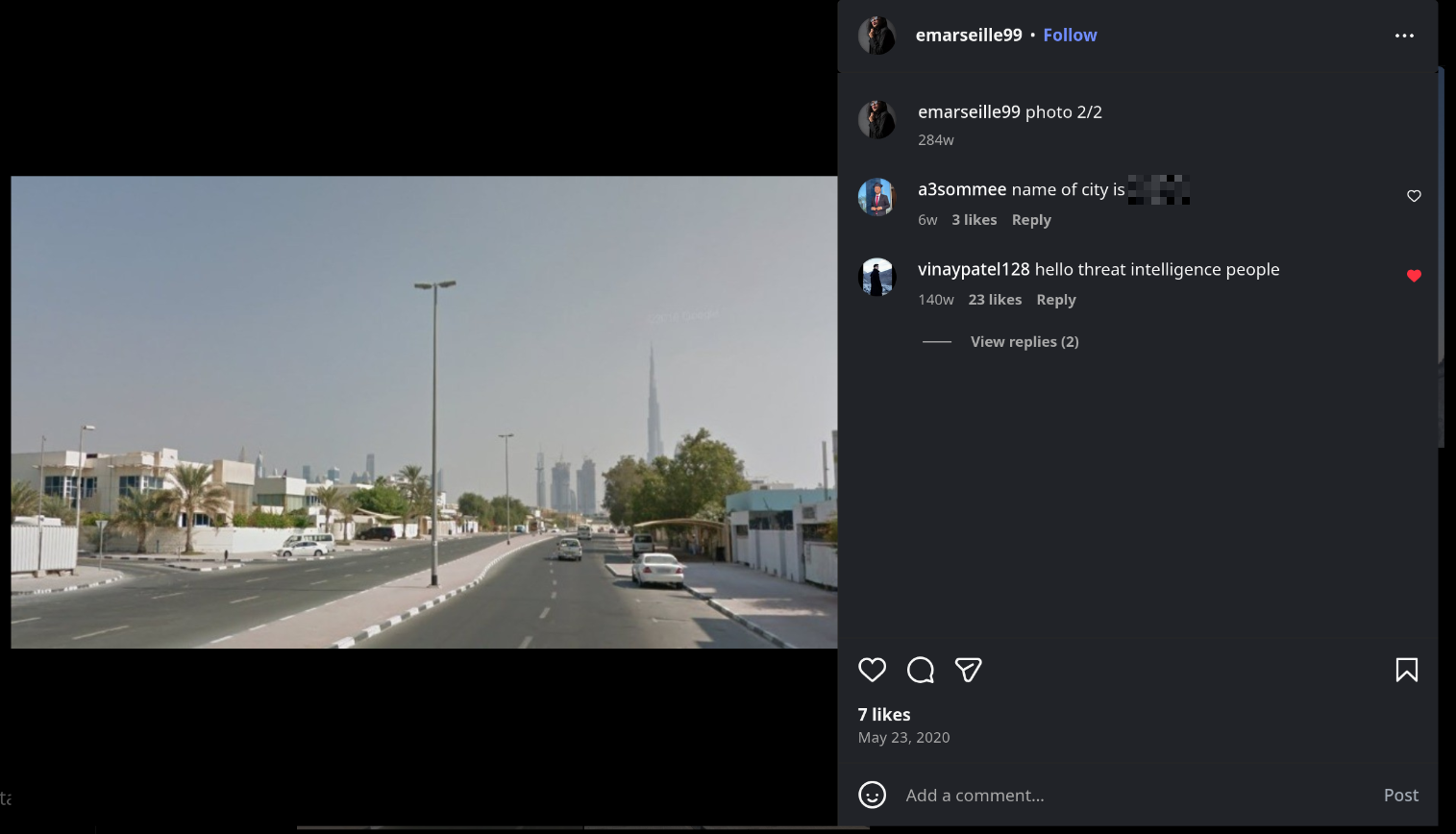 Annoyingly one of the comments just gives us the answer. This can be something you find in real OSINT Investigations though, as people have a tendency to tag images with the location of where they’re taken. I’ve blurred it out, but that’s another way that you can get the answer.
Another way to get this answer is to focus on the building in the background. That’s a pretty big building, in fact I’d say it’s the tallest building in the world. Knowing where that building is located gives us the answer. I’m sure reverse image searching can also give you the answer, but knowing what that building is is important too.
That’s it for the Instagram-based OSINT part of this lab.
Question eight
File -> office.jpg: You have been provided with a picture of the building in which the company has an office. Which city is the company located in?
Here’s the photo of the building (And of some other, more important details):
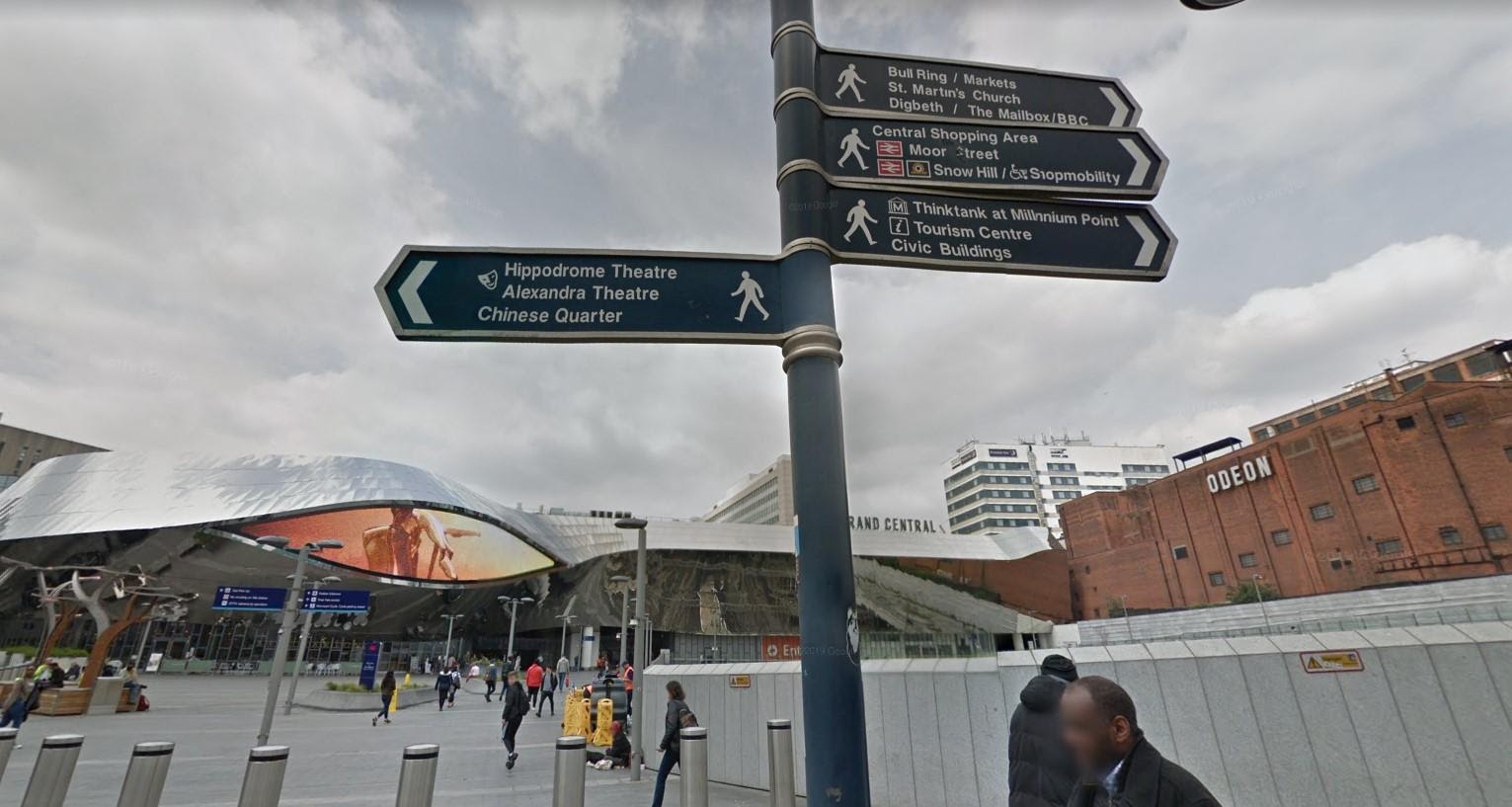
THe first thing we should be looking at for this is the big street sign in the middle of the frame. To the left of wherever this image was taken (from google maps) is something called the ‘Hippodrome Theatre’. Even if this is a theatre chain we can still correlate with the other landmarks.
Let’s first check how many ‘Hippodrome Theatre’s there are:
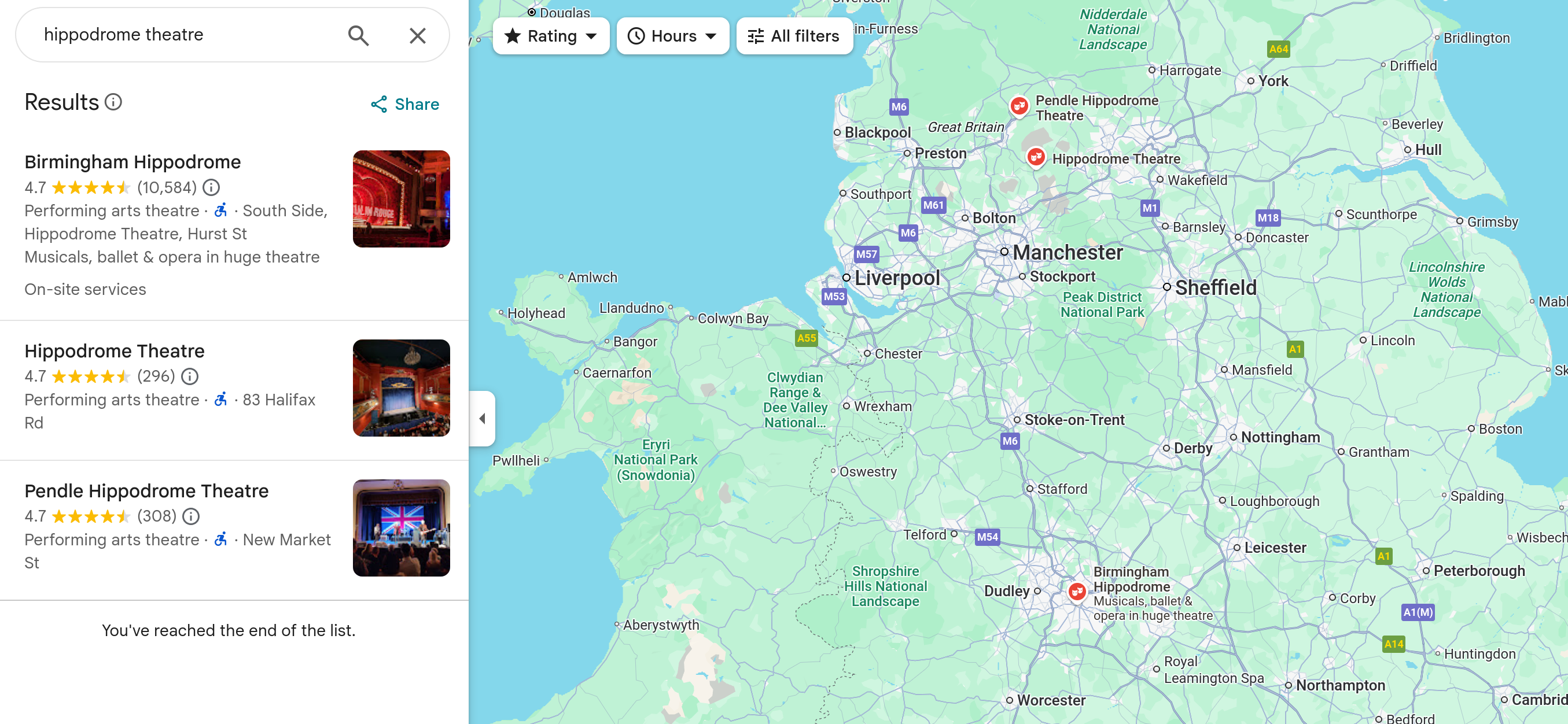
Turns out there’s three of them in the UK. We can guess that we’re on the right track by taking a peek at the GitHub profile. They have mentioned that their location is somewhere in the EU, so this adds up.
For all you ‘Um ackshually’ types out there. Yes, the UK isn’t in the EU. You’re very smart.
One of these ‘Hippodrome Theatre’s right slap bang in the middle of Birmingham. The other two are in-between Manchester and Leeds. Our next steps here are to correlate other points of interest.
The next thing I searched for was ‘Alexandra Theatre’. While zoomed in to the part of the UK shown above it quickly moved in and focused on a single ‘Alexandra Theatre’ in a specific city. That was our answer.
I managed to find the exact spot where this image was taken (again, it was actually taken from Google maps). I’ve highlighted the few things we can correlate from the office.jpg image we were given earlier, but there is plenty more that matches up. Like the big reflective building for one:
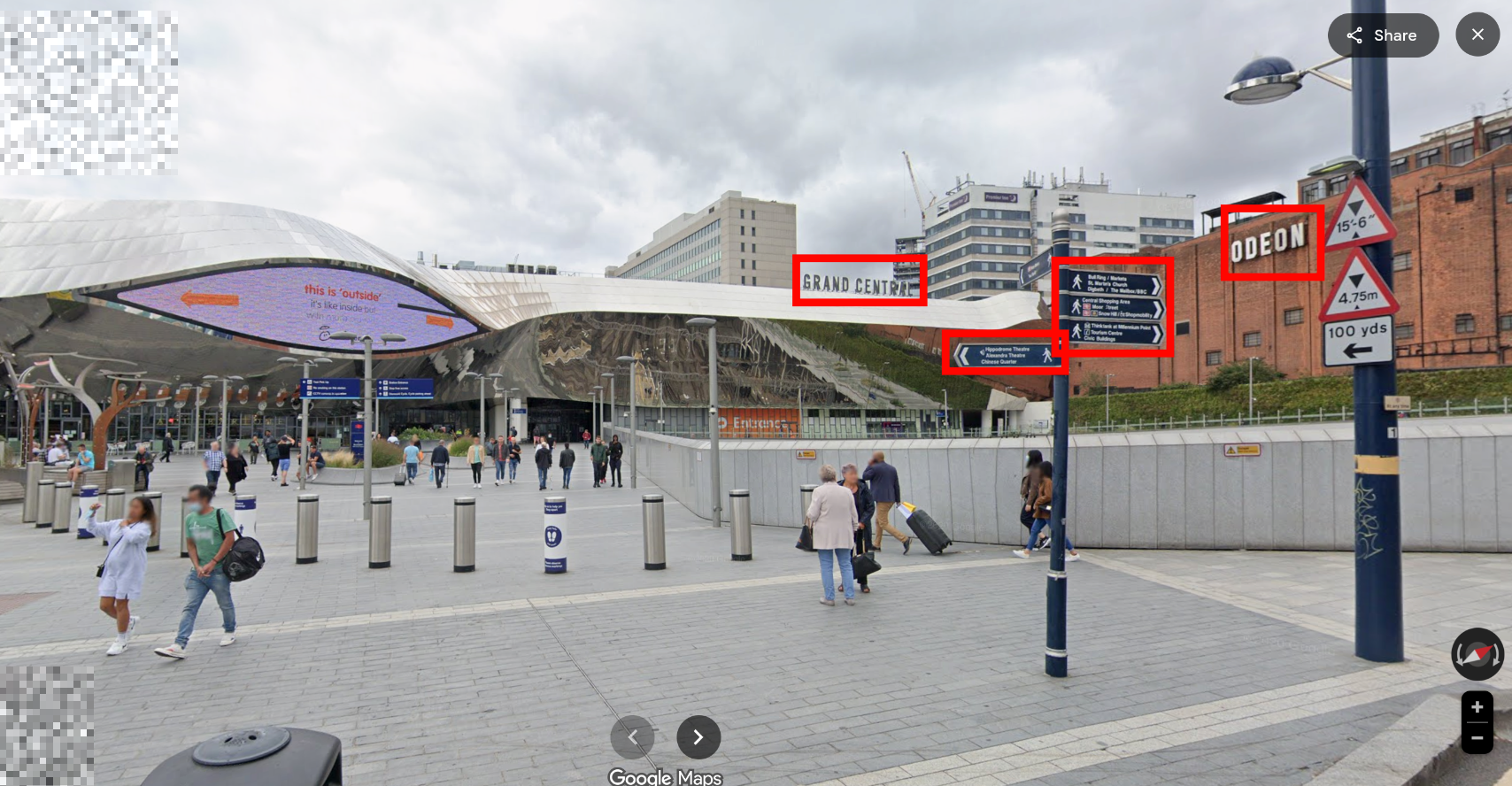
That was a big of a tangent. Once we know the city we know the answer. Easy as.
Question nine
File -> Webcam.png: With the intel, you have provided, our ground surveillance unit is now overlooking the person of interest suspected address. They saw them leaving their apartment and followed them to the airport. Their plane took off and landed in another country. Our intelligence team spotted the target with this IP camera. Which state is this camera in?
Quite a story with this final question. Thankfully we don’t need to go on such a wild goose chase like we did in the last question. We’re given this image:
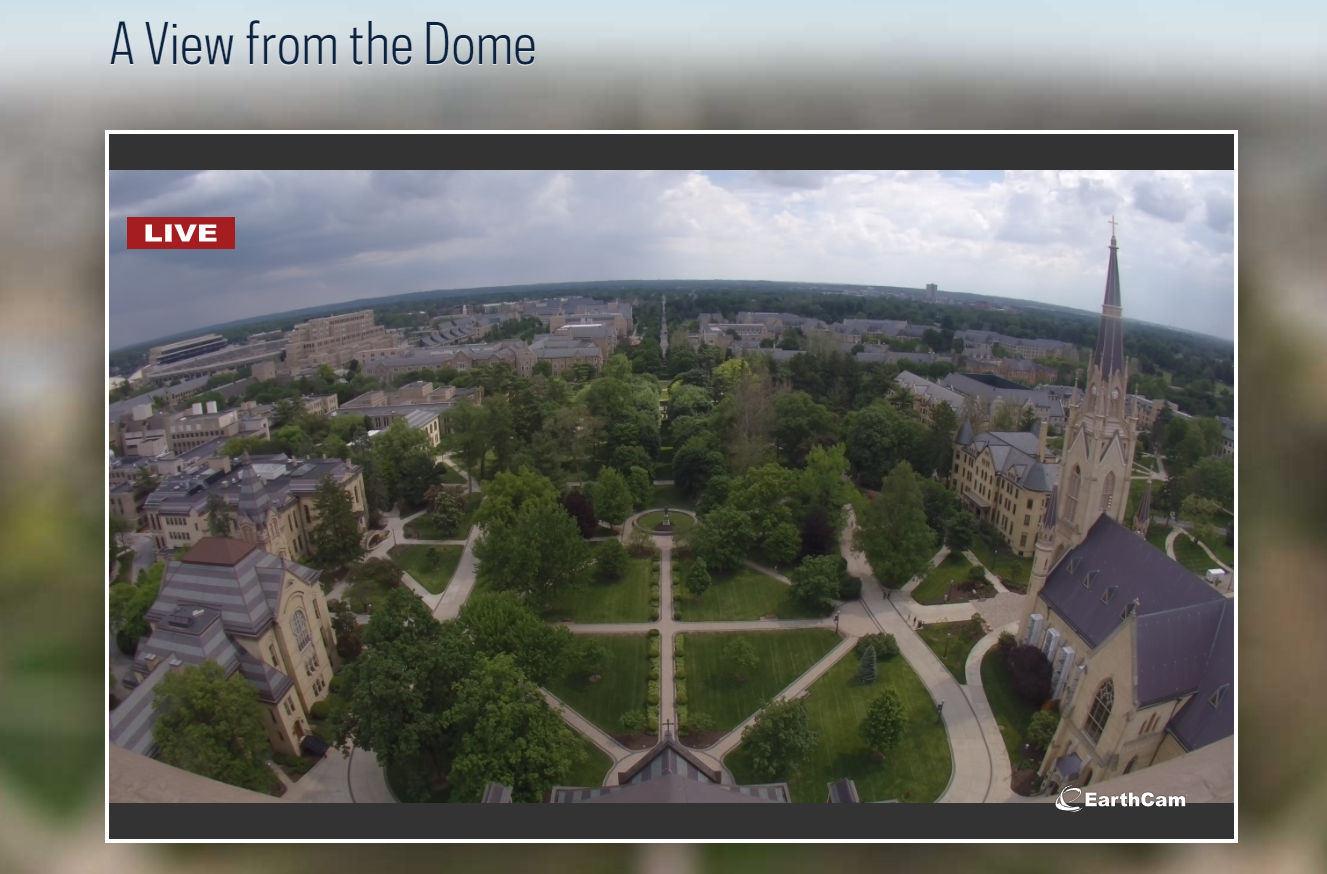
We can pretty simply pop this into Google Lens/Images like we had done previously, and we’re given the answer almost straight away:
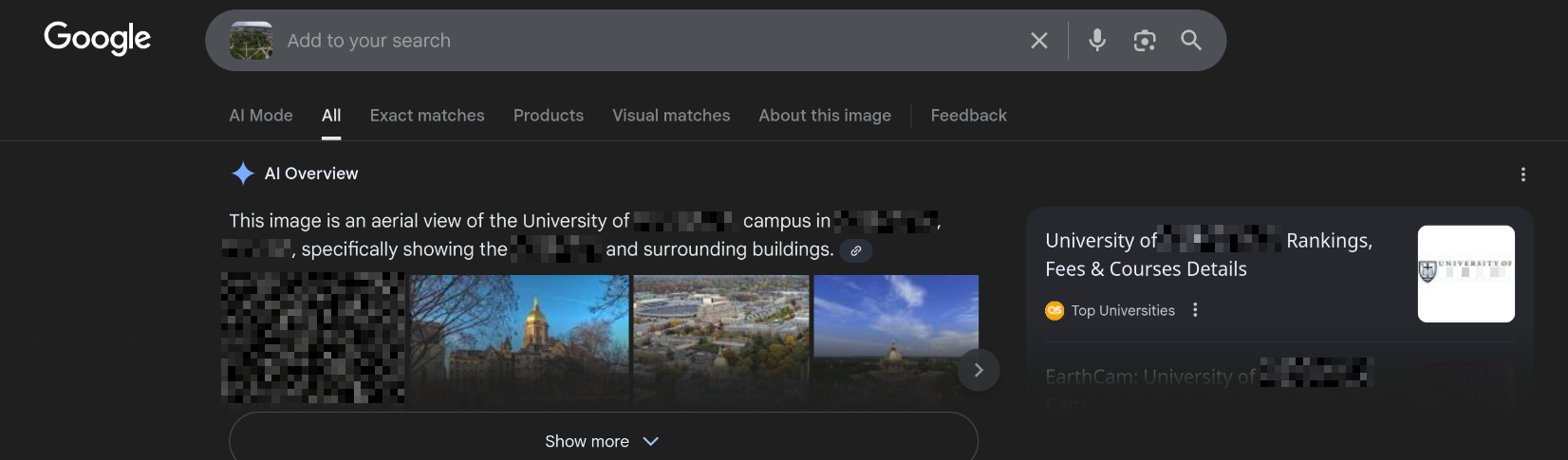
Easy peasy. And a fun little story to go with it.
Conclusion
Like the previous labs I’ve done for CyberDefenders, this was fun! It was pretty straightforward too. THe only time I really got tied up was when I misread question four and tried to find what their gaming habits were.
Nice little touch here that the name of the lab; L’Espion, means The Spy in French.